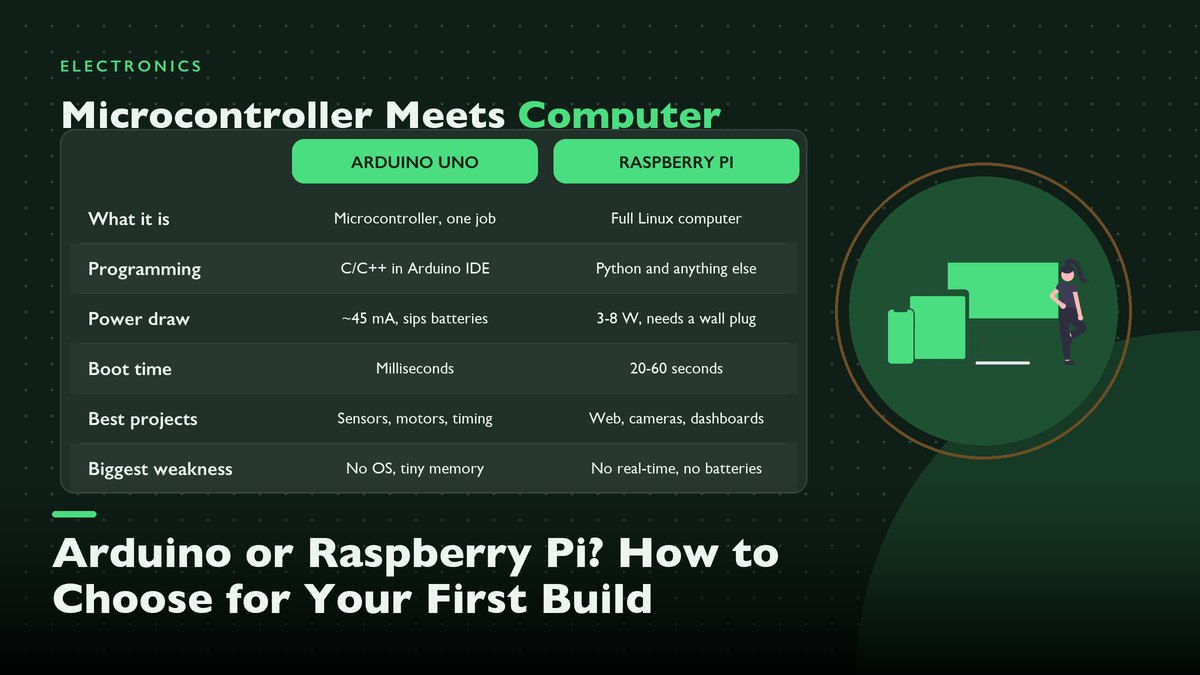
One board runs a single loop of code on less power than a night-light; the other boots a full Linux desktop and draws more current than a phone charger. Buying the wrong one for a first project is the most common, and most avoidable, mistake in this hobby, so here is the honest side-by-side I wish I’d had before my first cart checkout.
The standard advice to every new electronics hobbyist goes something like this: start with an Arduino, graduate to a Raspberry Pi later, and buy whichever one the project in front of you actually needs. It sounds tidy. Tidy, and mostly wrong. It’s also how people end up with a $60 Linux computer running one blinking LED, or an 8-bit microcontroller drowning in a web request it was never built to answer. I’ve built projects on both boards for years now, and my honest answer to the “which first?” question has stayed the same the whole time. It depends on exactly one thing, and it isn’t price, and it isn’t how much code you already know.
What matters is how much computer your project actually needs. The two boards get compared like rival products, but they’re closer to a screwdriver and a drill press sitting on the same shelf. Different jobs. An Arduino Uno is a microcontroller board. One chip, one program, no operating system, and it starts running your instructions within a millisecond of power arriving. A Raspberry Pi is a whole computer on a credit-card board, complete with a quad-core processor, gigabytes of RAM, and full Linux, plus USB ports and HDMI out. A pin header on top just happens to touch electronics.
One of them executes instructions with timing you could set a watch by. The other juggles a hundred background tasks and reaches your sensor when the scheduler finally allows it. Both cost roughly the same as takeout for two. Neither one replaces the other, and anyone who tells you one made the other obsolete has probably never wired either to a battery.
The Thirty-Second Version
| Arduino Uno | Raspberry Pi 5 | |
|---|---|---|
| What it is | Microcontroller board (ATmega328P) | Single-board computer (quad-core Arm) |
| Runs | Your one program, forever, nothing else | Full Linux, apps, browser, background services |
| Programming | C/C++ in the Arduino IDE | Python, and more or less any Linux language |
| Memory | 32 KB flash, 2 KB RAM | 4–16 GB RAM, plus microSD storage |
| Logic voltage | 5 V pins, 20 mA per pin | 3.3 V pins, no 5 V tolerance |
| Power draw | ~45 mA at 5 V (about 0.25 W) | 3–8 W depending on load; wants a 5 V/5 A supply |
| Boot | Milliseconds to first instruction | 20–60 seconds to a usable desktop |
| Typical price | ~$30, official or clone | $60 (4 GB) to $80 (8 GB), plus card and supply |
If a single row decides it for you, make it power draw. For most builds, anyway. A board that sips a quarter watt and one that wants a 27-watt phone charger live in completely different project worlds, and no amount of cleverness moves them closer together.
What You’re Actually Choosing Between
Microcontroller vs. single-board computer — the distinction that matters more than any spec
An Arduino Uno, in its official Uno Rev3 hardware documentation, is built around the ATmega328P, an 8-bit chip running at 16 MHz with 32 KB of program space and 2 KB of working RAM. Those numbers sound absurd next to any modern gadget. They are. The absurdity is the point. There is no operating system competing for the CPU, no update daemon, no forty background processes. When your code says read the sensor now, it reads the sensor now. The gap between that line and the pin changing is measured in microseconds, and it stays that way across years of uptime.
A Raspberry Pi, by contrast, is a real computer wearing a hobbyist’s clothes. The Pi 5 carries a quad-core Arm Cortex-A76 at 2.4 GHz with 4, 8, or 16 GB of RAM. Raspberry Pi’s official learning portal walks you through everything from installing the OS to configuring the 40-pin header. A real computer, shrunk. You can plug in a monitor, open a browser, edit your code, and stream music simultaneously, because Linux does on this board exactly what it does on any desktop. That power arrives with all the usual computer baggage. The baggage is what shapes most of the advice below.
The mental model I hand people is simple. The Arduino is the nervous system. Small, always alert, reacting to the world in real time. The Pi is the brain. It thinks, it stores, it connects. But it also blinks and boots and updates and expects a polite shutdown every single time. A surprising number of projects honestly need both, which is why so many workbenches end up with a Pi sending commands to an Arduino over USB, each doing the half it’s actually good at.
Programming: One Loop vs. a Whole Operating System
Writing code for the Arduino means writing C/C++, in a beginner-friendly dialect, inside the Arduino IDE. Every sketch has the same skeleton: a setup() function that runs once, then a loop() function that runs forever, tens of thousands of times per second. That constraint felt limiting to me at first. Within a week it became the thing I loved most, because there’s nowhere for bugs to hide. When the garage-door watcher I built misbehaved, the entire program was forty lines long, and I could read every one of them in my head.
The Pi frees you from all that structure, which is both the gift and the trap. Both show up eventually. You write Python (the language whose official docs at python.org are genuinely pleasant to learn from), or JavaScript, or C, or anything else that installs on Linux. If your project needs to check a weather API, save to a database, serve a web page, then email you an alert, the Pi does all four without breaking a sweat. Try stuffing any one of those jobs into 32 KB of flash and 2 KB of RAM and you’ll feel the walls of the Arduino very quickly. The trap is that a full operating system also means full operating-system problems. Dependencies conflict, SD cards fill up, services stop starting for reasons nobody wrote down.
My honest guidance for a beginner. If you’ve never written a line of code, the Arduino’s tiny world is the gentler on-ramp, because the whole system fits in your head at once. If you already write code in any language, the Pi will feel like home within an hour, and you’ll probably want it anyway for anything involving networking or storage.
Power, Boot Time, and the GPIO Traps
The spec sheets get concrete here. An Uno idles at roughly 45 mA from a 5 V source, so about a quarter of a watt. Tiny. Months on AAs, easily. Connect it to a $10 pack of AA batteries and it will sit in the corner reading a sensor for months. It wakes the instant power returns. A Pi 5 idles around 3 to 5 W and wants the proper 5 V/5 A USB-C supply, the 27-watt adapter in the box rather than some drawer-cable gamble. Run it on an undersized supply and you get the classic Pi beginner experience: the lightning bolt icon, weird crashes, an SD card that eventually corrupts itself and refuses to boot on a random Tuesday morning.
Boot behavior follows the same split. The Uno starts executing your code within milliseconds of power arriving, which is why it can live inside a battery gadget or a Halloween prop that must simply work the moment someone walks up. The Pi takes somewhere between 20 and 60 seconds to reach a usable desktop, and it expects a proper shutdown command every single time. Yank power from an Arduino and it shrugs. Yank power from a Pi mid-write and you’re rolling the corruption dice. Every single time. I keep a small UPS-style add-on board on my always-on Pi for exactly this reason, and I’d suggest the same for anything unattended.
Then there’s the pin voltage trap, and it catches everyone once. The Uno’s GPIO pins speak 5-volt logic and can source around 20 mA each, which lines up nicely with old 5 V sensors, relay boards, plain LED strips. The Pi’s pins are 3.3 V logic, most aren’t 5 V tolerant, and they source less current. Feed a 5 V signal straight into a Pi pin and you’ve possibly killed that pin, or the whole board. Level shifting between the two is a two-dollar problem with a ready-made fix, and the SparkFun tutorials on voltage and current explain the why far better than a paragraph here can.
Where the Arduino Earns Its Keep
The Arduino’s home turf is the real, physical, timing-sensitive world. Battery-powered soil monitors that wake once an hour and sleep the rest of the time. Button boxes and custom keyboard controllers where a five-millisecond delay is noticeable to a human finger. LED wearables that must flicker in exact patterns for a whole parade. Anything driving stepper motors (a camera slider, a small CNC, a pen plotter) where the pulses that move the motor must arrive on schedule every time, because a late pulse is a stalled motor and a ruined workpiece.
It also wins on ruggedness in a way that surprises people. No file system means nothing to corrupt. No OS means no updates, no login, no broken Tuesdays. Corruption needs a file system to eat. I have an Uno clone screwed inside my garage door housing that has run the same thirty lines since the day I uploaded them, through summers and winters, on the same power brick, and the only reason I open the housing is dust. Years, at this point. That’s the microcontroller promise, and the Pi simply can’t make it.
Where the Arduino Falls Apart
Be honest about the walls, because they’re close together. Networking on an Uno means an add-on shield or a module, and even then you’re working hard for a slow connection. Storing data means an SD card module and careful byte bookkeeping. Bytes, not gigabytes. Driving a big display is possible and painful. If your project wants to talk to the internet, hold more than a few hundred readings, play audio, or do anything resembling multitasking, you’ll spend your time fighting the hardware instead of building the thing you imagined. By my rough count, two kilobytes of RAM runs out before one-tenth of one second of uncompressed audio would even fit.
And while the C-based environment is friendly, it’s still compiled code with memory you manage yourself. Arrays overflow silently, pointers misbehave in ways Python would have caught, and the friendly String class fragments the tiny heap if you lean on it in a loop. These are learnable problems, and honestly learning them makes you a better programmer. They’re just not the problems you wanted to solve when you sat down to build a plant monitor.
Where the Raspberry Pi Earns Its Keep
The Pi is the right brain for anything whose main job is thinking rather than reacting. A weather station that logs to a database and draws graphs. A home server running Pi-hole to eat the ads on every device in the house. The whole network benefits. A 3D-print controller running OctoPrint so you can watch and manage the printer from your phone, something I run alongside the calibration routine in our first-printer setup guide and can’t imagine giving up. Magic mirrors, retro game consoles, network-attached storage, a camera that detects the cat and posts a photo. If the sentence describing your project contains the words web page, database, camera, or stream, the Pi is probably already the correct answer.
It also earns its keep as the most honest way to learn Linux without risking a laptop. Breaking a $60 board’s OS is a 10-minute re-flash rather than a family tech-support emergency. The GPIO header on top means you can still blink an LED and read a button on day one, starting with Adafruit’s venerable Blink lesson, even when your ambitions are pure Python. That combination, a real computer upstairs and an electronics bench downstairs, is the Pi’s whole pitch. It’s a good pitch.
Where the Pi Falls Apart
The failures are mostly the mirror image of the Arduino’s. Put it on batteries and you’ll watch the runtime shrink from months to hours. Ask it to bit-bang a precise protocol in Python and Linux will occasionally pause your program for 20 ms to do something more important, which ruins timing-sensitive work. The boot delay rules out instant-on gadgets. The SD card is a storage point of failure that slowly wears out. The 3.3 V-only pins mean the box of 5 V hobby parts from the Arduino bin needs translating before it can play. There’s also the quiet cost creep, where the $60 board becomes $90 once you’ve added the card, the supply, the case, while the Uno clones sit at $10 with everything included but the cable.
None of this makes the Pi a bad choice. It makes it a computer, with a computer’s habits, and most of the skill in choosing between these boards is matching those habits to what a project can tolerate. Wall-powered, networked, thinking projects love the Pi’s habits. Battery, instant-on, timing-critical projects find them intolerable. Simple as that, more or less.
The Middle Ground Nobody Mentions
Between the two extremes sits a category that has taken over my own parts bin in recent years. Fast modern microcontrollers that program like Arduinos and cost pocket change. Pocket change, literally. The Raspberry Pi Pico, at $4, is technically a Raspberry Pi product that behaves nothing like the big boards. It’s a dual-core RP2040 microcontroller with 264 KB of RAM, 3.3 V logic, and the ability to run MicroPython or C with timing precise enough for LED strips and motor control. And the ESP32, usually under $10 from any parts supplier, adds Wi-Fi and Bluetooth to the same microcontroller formula while staying programmable from the familiar Arduino IDE.
I bring this up because “Arduino or Pi” is often really “timing or connectivity,” and the Pico and ESP32 answer connectivity on a microcontroller’s power budget. A battery sensor node that wakes up, takes a reading, posts it to your Wi-Fi every ten minutes used to force a whole Pi into the enclosure. Now it runs a year on two AA batteries and an $8 chip. A year. Two batteries. My advice: start with the Uno or the Pi to learn the ropes, but know this middle shelf exists, because the project after your first one will probably live there.
Five Builds, Five Honest Picks
Theory settles arguments less well than actual projects do, so I’ll walk through five common first builds and the board I’d hand you for each.
- For a battery plant monitor: Arduino or ESP32, full stop. It sleeps fifty-nine minutes of every hour, sips microamps the whole time, then wakes for one reading. No Pi on batteries matches that lifespan.
- A button-box controller for flight sims: Arduino. Eight buttons and two encoders over USB HID, with keypress latency in microseconds because no operating system stands between your inputs and the computer.
- Retro console for the TV: Raspberry Pi, and it isn’t close. Emulation wants real CPU power, HDMI out, and enough RAM for game files; the microcontroller doesn’t have any of the three. Budget one evening for the software setup and a stack of games, and you’ll be playing on the TV by midnight with a console that cost less than one new game.
- Bird-feeder camera: Raspberry Pi with the camera connector. Image capture and any computer vision need the Pi’s horsepower, since one photo won’t fit in 2 KB of RAM. This pick makes itself.
- Motorized camera slider: Arduino running a stepper sketch. Motor pulses must land on schedule every time, and the microcontroller delivers them without a scheduler stealing cycles.
Notice how rarely the answer is “whichever you have on hand.” Each pick falls straight out of the constraints covered earlier. Power, timing, memory. By the time a project is described honestly, the board has usually picked itself.
How to Decide in Five Minutes
When someone asks me at the workbench, I run these questions in order and stop at the first yes:
- Battery power or instant-on. If the project runs on batteries, or must react the moment power appears, buy an Arduino-class board. This rule is absolute, and no clever workaround ends well.
- Web, storage, or screen. If it needs Wi-Fi, a web page, a database, a camera, or real graphics on a display, buy the Pi and don’t look back at the microcontroller bin.
- Motors and fast signals. Anything that moves steppers, blinks precise light patterns, or reads sensors faster than a human blink wants a microcontroller, because deterministic timing is the one thing Linux won’t give you.
- Learning goals. If the real goal is learning programming or Linux itself, take the Pi. It’s a full computer, and breaking things on it teaches you the real skills.
- Tiny budget, simple project. Grab a $4 Pico and thank me later; you can graduate to either big board from there.
If you answered no to everything, flip a coin and start tonight. The boards cost about the same as the pizza you’ll eat while soldering, and the skills transfer in both directions once you know one. That’s the truth the spec-sheet wars miss. These aren’t rival teams. They’re two tools, and the maker who owns both answers every project on the first try.
Prices and specs reflect the official boards as of October 2026 and drift over time, so check the Arduino hardware docs and the official Raspberry Pi projects site before budgeting. Related reads include the 3D printer setup guide that pairs with the Pi-based print server mentioned above, plus the soldering and circuit-diagram guides elsewhere on this site.
Leave a Reply