A schematic reads like abstract art for roughly your first hundred encounters with one. Then the symbols repeat and the lines start meaning something, and one afternoon you catch yourself reading a stranger’s circuit the way you’d read a recipe. This is the path from wall to fluency, symbol by symbol.
Every electronics hobbyist hits the same wall. Say you’ve got a breadboard, a pile of parts, plus a project page with a small black-and-white drawing full of zigzag lines and mysterious arrows, and the drawing might as well be sheet music. That wall comes down faster than you’d expect, because a schematic carries maybe forty common symbols in total, and the projects you’re likely to build in your first year lean on about fifteen of them. Learn those fifteen and you can read most of what the hobby throws at you, starting with the reference many of us began with, SparkFun’s classic tutorial, How to Read a Schematic, which pairs every symbol in this article with a clear drawing.
I’m going to assume you can already copy a simple build from a photo or a wiring diagram. That skill matters and it stays useful. But photos scale badly past about ten parts, and no photograph can show what’s happening inside an integrated circuit. The schematic solves both problems at once, because it shows connections rather than appearances. What follows is the order I’d give a friend who asked me over coffee. The symbols come first, then the power and ground conventions that trip nearly everyone, and finally the move that turns a drawing into a working breadboard layout.
Why the Drawing Looks Hostile
It’s a map of connections, not a portrait of parts
The hostility is mostly historical. Electrical symbols were standardized in parallel on two continents, and the two camps drew several parts differently. The zigzag resistor you’ll see in American books comes from the ANSI and IEEE 315 tradition, while most of the rest of the world settled on a plain rectangle under IEC 60617, the international graphical-symbol standard. Both versions are still in circulation, which is why an Arduino-era schematic might show a rectangle where a 1970s textbook shows a squiggle. Same part, same job, different accent. And honestly, once you’ve seen both a few times, your eyes stop caring which one is on the page.
Once you know that, the whole genre relaxes. Nothing on a schematic is drawn to scale, and parts appear wherever they keep the lines tidy. The lines themselves are the real content. Each one is an ideal wire, so if two lines touch at a filled dot, those points are the same electrical point, and if they cross with no dot, they pass by unconnected. Two rules do most of the work in any drawing you’ll meet.
The Core Symbols You’ll Actually Meet
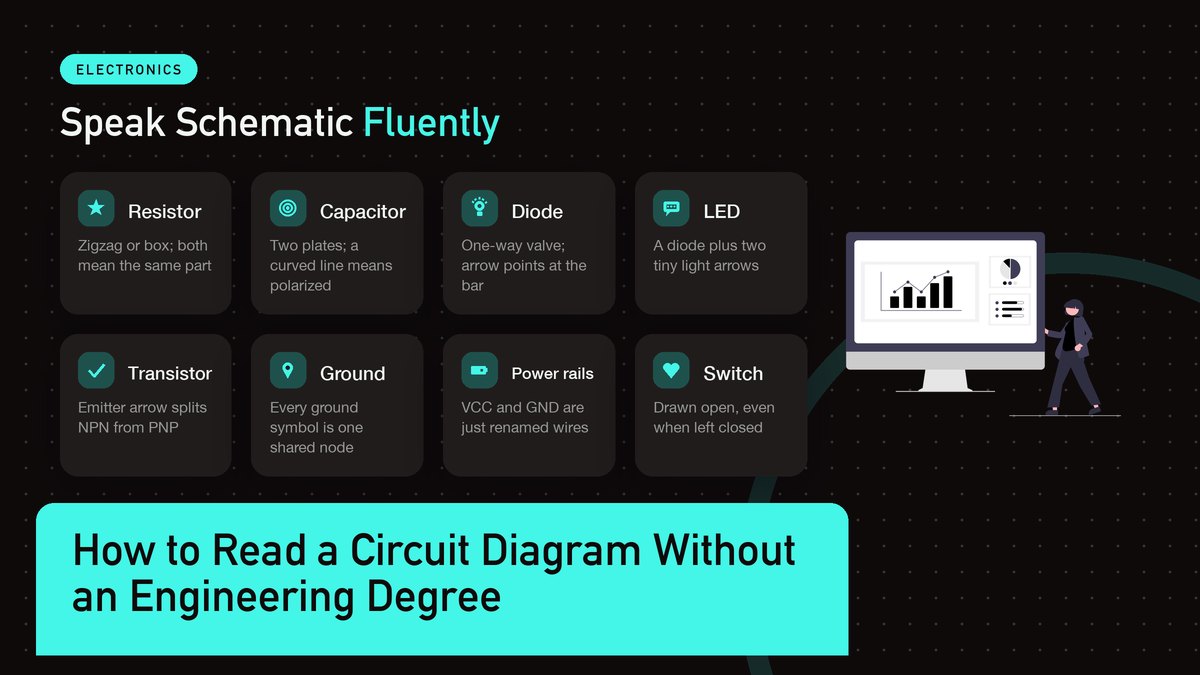
Start with the small cast of parts that shows up in nearly every beginner and intermediate project. The table below is the working vocabulary; the sections after it walk through the four symbols where orientation actually matters.
| Symbol | What it does | The detail that trips people |
|---|---|---|
| Resistor | Limits current, divides voltage | Zigzag (US) or rectangle (IEC) mean the same part |
| Capacitor | Stores charge, smooths voltage | Two straight lines is either-way; a curved line means polarized |
| Diode | One-way valve for current | The triangle points at the bar; current flows the arrow’s way |
| LED | A diode that makes light | Diode symbol plus two small arrows, light escaping |
| Transistor | A valve controlled by a small current | The emitter arrow tells NPN from PNP at a glance |
| Ground | The return path back to the supply | Every ground symbol on the page is one single node |
| Battery / power | The voltage source for the circuit | Long line is positive, short line is negative |
| Switch | Opens or closes a path | Usually drawn open even when your build leaves it closed |
Resistors: The Zigzag and the Box
Begin with the resistor, because it’s the simplest part with a symbol worth arguing about. In American drawings you’ll see a zigzag; in European output and most modern CAD tools you’ll see a small empty rectangle. They’re interchangeable, and I wouldn’t spend a minute worrying about which one a given drawing uses. The label beside the symbol does the real work. R3 tells you it’s the third resistor on the board, and 4.7k tells you it resists with about 4,700 ohms, while plain numbers like 220 or 470 with no unit at all mean ohms, since everyone agrees on that much.
One notation catches almost everyone eventually. A value like 4k7 uses the letter k as a decimal point, which reads as 4.7 kilohms, and older European schematics write 2M2 for two-point-two megohms. It looks like a typo the first time you meet it. It isn’t.
Capacitors: Mind the Curve
The plain capacitor symbol is two parallel lines that never touch, which is honestly a small portrait of the part itself, two metal plates held apart by a gap. That version is non-polarized, so you can drop it into a breadboard either way and sleep fine.
That curved line changes everything. When one plate of the symbol bends into a curve, or a plus sign appears beside it, the part is polarized, usually an electrolytic or tantalum can. Insert it backwards and it can leak, heat up, or in rare cases pop with a smell that lingers in the workshop. The curved plate marks the negative side on the drawing, and on the physical part the negative leg is commonly the shorter one, with a stripe running down that side of the can. Two independent clues. Use both, and you’ll be fine.
Diodes and LEDs: Follow the Arrow
A diode is a one-way valve, and the symbol says so out loud. A triangle points at a vertical bar, and conventional current flows in the direction the arrow points, into the bar and onward, while a battery wired the other way meets the diode’s wall. The two terminals have names worth memorizing because every datasheet uses them: the arrow side is the anode, the bar side is the cathode. B and C. There’s your mnemonic.
An LED adds almost nothing to the drawing, just the diode symbol with two little arrows beside it, light escaping. On the physical part the cathode is often the shorter leg, with the flat spot on the LED’s rim marking it as a backup; inside many clear LEDs the larger internal pad is the cathode too. Three clues pointing the same way. If they ever disagree, trust the flat spot, because that’s molded into the package and doesn’t get bent by a previous project.
Transistors: One Arrow Settles It
The transistor symbol intimidates people for no good reason. It’s a vertical line with three legs (collector, base, emitter) and sometimes a circle around the whole thing, though modern drawings often skip the circle. The only detail you must extract on sight is a small arrow, and it always lives on the emitter leg.
If that arrow points away from the base, outward, you’ve got an NPN transistor. If it points inward, toward the base, it’s PNP. The old mnemonic still works, and I’ve leaned on it for years: NPN means Not Pointing iN. Most Arduino-adjacent projects reach for NPN parts like the 2N2222 or the BC547, so when a schematic stays silent about flavor, NPN is a decent guess. The rest of the drawing is identical either way. Only the arrow direction tells them apart.
A schematic is a map of connections, not a portrait of parts. Learn what the lines say, and the rest is lookup.
Power, Ground, and the Rails Nobody Explains
This is where most beginners stall, because the drawing suddenly stops drawing things. Wires to the battery and to ground get replaced by little symbols and text labels: VCC, 5V, 3V3, GND. All of these are still ordinary wires, just renamed. VCC is the positive supply rail, a name descended from bipolar-transistor circuits where it meant the voltage at the collectors, and GND is the common return that every current in the circuit eventually flows back to. When a resistor connects to VCC on the schematic, picture a wire running from that resistor across your bench and into the red rail of the breadboard, because that rail and that label are the same node drawn in two dialects.
Ground earns its own paragraph because it does more work than its humble symbol suggests. The three stacked lines that taper downward mean signal ground in a hobby schematic, and every instance of that symbol on the page is the same electrical point, even when the drawing shows five or ten of them scattered around. When a bench circuit misbehaves, the first thing I’d check is a ground that exists on paper but was never jumpered on the breadboard. I lost an hour to exactly that mistake once, hunting a fault that turned out to be one missing GND wire from a chip. An hour, for one jumper.
Voltage labels deserve the same respect, because here’s the most confusing convention in all of schematic reading. When two parts both connect to a net labeled 3V3, they’re connected to each other through the label itself, even though no wire joins them on the page. Same label, same node. Read it twice and it sticks forever. Chips carry their own dialect too. Many ICs label their supply pins VDD and VSS instead of VCC and GND, a leftover from MOSFET circuits, and the schematic will almost always translate for you. Old habit, same meaning. Underneath all of this sit the voltage and current fundamentals, and SparkFun’s Ohm’s law tutorial is the friendliest warm-up I’ve found if the physics side feels rusty.
Reading the Drawing in One Pass
When a new schematic lands in front of me, I read it in a fixed order that saves real time. First, find the power: where voltage enters and where ground lives. Second, find the load, meaning the LED, the motor, or the speaker, because that’s the thing the circuit exists to drive. Third, find what controls the load, whether that’s a transistor, a switch, or a chip pin. Walk the path from supply, through the control element, to the load, and back to ground, and you’ve reconstructed the story the drawing is telling.
Reference designators reward a glance too. The letter tells you the family (R for resistors, C for capacitors, D for diodes, Q for transistors, U for chips), and the number just orders them on the page. They look like noise at first. They’re actually the bridge between a schematic and any build guide, because when a tutorial says “install R4,” that label is how you find R4 on both documents. For anything rare that wanders in, from a quartz crystal to a transformer, Wikipedia’s electronic symbol reference shows both the ANSI and IEC variants side by side.
One more habit worth stealing: the values printed on a schematic are the design’s intent, not a shopping list. If the drawing calls for 4.7k and your parts bin offers 4.99k or 5.1k, the circuit almost certainly won’t care, because resistors come in standard steps anyway and the design was rounded to one of them from the start. Build with what’s in front of you. Order exact values when a project says it matters, like a timing circuit or a precision divider.
From the Drawing to the Breadboard
This is the payoff move, going from paper to a working layout, and it goes wrong in predictable places. So I build in a fixed order, and I’d suggest you do the same until your own habits settle. Rails first, always.
- Orient the schematic the way you’ll build. I sketch a rough map first: power at the top, ground at the bottom, inputs on the left. A schematic drawn at a weird angle still translates fine once you impose your own compass on it.
- Wire the rails first, red to 5V and blue to GND, and jumper both long side rails so you don’t run out of ground holes two components in.
- Place the biggest part, pins first. An IC straddles the breadboard trench down its middle so every pin lands in its own row, and the smaller parts fill in around it afterward.
- Check every polarized part twice. LED flat side, capacitor stripe, transistor flat face, each one verified against the symbol before power goes anywhere near the board. One reversed cap can sour a whole evening.
- Add the decoupling capacitor. The drawing usually shows 100 nF from the chip’s VCC pin to GND. Skipping it is how you get a circuit that works on the bench and fails on a Tuesday for no visible reason. Ask me how I know.
- Power last, meter first. Before the first switch-on, I touch the meter across the supply pins to confirm the voltage the schematic promised is the voltage that actually arrived.
The Arduino built-in examples page pairs a schematic with a wiring diagram for every circuit it teaches, which makes it the perfect practice ground for this exact translation. You can read the drawing, build your interpretation, and then check it against a finished layout that someone else already debugged.
Once the circuit works, take a photo of the breadboard from straight above, while the wiring is still honest. I’ve lost count of the times I tore down a working build and then spent the next weekend trying to remember which resistor went where, and one overhead photo would have settled every one of those afternoons in about a minute. Label the photo with the project name while you still remember which project it was.
Reading Schematics That Aren’t Yours
Most of the schematics you’ll read weren’t drawn for you. They come from project pages, forum threads, old magazine scans, and they carry their authors’ habits along for the ride. Some label every net; some label none and expect you to trace lines with a finger. Some use the rectangle resistor, and half the internet still draws the zigzag. Adafruit’s Learn Arduino series is a good example of the friendlier style, with one concept per page and a wiring diagram sitting next to each schematic, while the official Arduino tutorial archive does something similar at much bigger scale. Reading a lot of these, even circuits you never build, trains the pattern recognition faster than anything else I know.
Drawing Your Own
You don’t have to draw schematics for a long while. But the day you start modifying circuits instead of copying them, sketching your own pays for itself, and free tools have erased every excuse. KiCad is the standard recommendation: actually free, open source, and the same package plenty of professionals use. Its getting-started documentation walks you through a first schematic from zero, and the habits it teaches, connecting with named nets and running the electrical rules check before you build, are exactly the discipline the pros rely on. Even a hand-drawn schematic on graph paper beats nothing, as long as the reference designators and values are written somewhere that you, six months from now, can still read.
The Moment It Clicks
None of this is magic, and none of it needs a degree. It needs maybe fifteen symbols and the two rules about wires and dots. Your first few schematics will feel slow, with a lot of tabbing back to a symbol chart. Then one evening you’ll skim a circuit someone posted, notice the missing pull-up resistor in their design, and type a reply before you’ve consciously parsed the drawing. That moment arrives for everyone who stays in the hobby long enough. It’s worth an hour of hunting for a ground jumper, and I’d say it’s worth a few.
External references checked October 2026: SparkFun’s schematic tutorial and Ohm’s law guide, the IEC 60617 overview on Wikipedia, Wikipedia’s electronic symbol reference, the Arduino built-in examples and official tutorial archive, Adafruit’s Learn Arduino series, and the KiCad getting-started documentation.
Leave a Reply